
Download 20 WORDS // 20 SECONDS – free fast‑paced typing game, word challenge, and vocabulary booster
Overview
20 WORDS // 20 SECONDS is a free‑to‑play typing challenge that puts your brain and fingers to the test. Developed by Kevin Hutchins for the 20‑Second Game Jam 2023, this web‑based game asks you to type twenty distinct words that satisfy a specific prompt—all within a relentless twenty‑second timer. The core mechanic is simple yet addictive: each round presents a new criterion—such as “a seven‑letter word,” “a word that starts with the letter S,” or “any word you like”—and you must type a fresh answer that has not been used earlier in the same session.
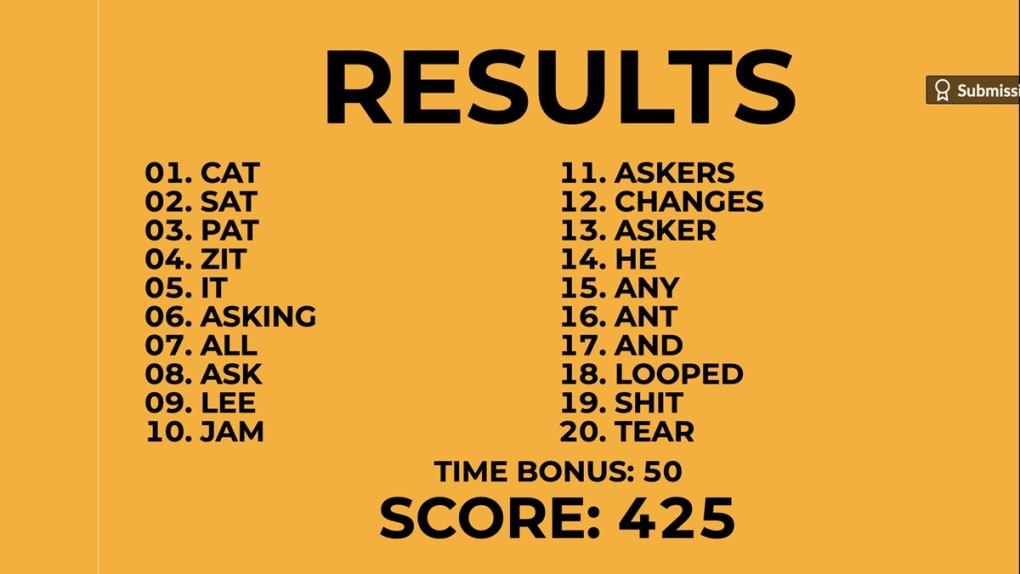
Scoring is a blend of speed, accuracy, and word length. You earn points for each correct entry, with later answers worth more points, and every character contributes additional points based on its position in the word. A time‑bonus adds extra flair, rewarding the fraction of a second you save after completing all twenty prompts.
While the game does not store high scores, its replay value is high: you can chase better times, expand your vocabulary, and experiment with the more relaxed “20 WORDS // ?? SECONDS” mode that removes the pressure of the strict countdown. Whether you’re a seasoned wordsmith, a casual gamer, or someone looking to sharpen typing skills, this title offers a quick, challenging burst of fun that fits perfectly into a coffee break or a short study session.
Key Features
- Rapid‑fire gameplay: Type twenty words in just twenty seconds, testing reflexes and vocabulary.
- Diverse prompts: From letter‑specific challenges to length‑based requirements, each round feels fresh.
- Dynamic scoring system: Points increase with answer order, word length, and remaining time, encouraging strategic typing.
- Relaxed mode: “20 WORDS // ?? SECONDS” lets you play without a timer, ideal for practice or casual play.
- Cross‑platform accessibility: Runs in any modern browser on Windows, macOS, Linux, Android, and iOS devices.
- Free and lightweight: No downloads required; simply visit the site and start typing.
- High replay value: Endless word combinations and the ability to improve scores make each session unique.
Installation, Usage & Compatibility
Installation: 20 WORDS // 20 SECONDS is a browser‑based application, so there is no traditional installation process. To get started, open your preferred web browser (Chrome, Firefox, Edge, Safari, or any Chromium‑based mobile browser) and navigate to the official game URL. The game loads instantly, requiring only a stable internet connection for the initial asset download.
First‑time setup: Once the page loads, you’ll see a brief tutorial explaining the rules and the scoring system. Click “Start” to begin the timed round, or select the “?? SECONDS” mode if you prefer a more leisurely pace. The interface features a single input box where you type your answers, and a prompt area that updates after each submission.
Gameplay tips: Because each word must be unique, it helps to keep a mental list of the words you’ve already used. Aim to type shorter words early to secure quick points, then move to longer or more complex prompts as the timer ticks down. The scoring algorithm rewards later answers, so a balanced approach—mixing speed with strategic word choice—yields the highest totals.
Compatibility: The game uses standard HTML5, CSS3, and JavaScript, ensuring seamless performance across all major operating systems:
- Windows 10, 11
- macOS Monterey and later
- Linux distributions with modern browsers
- Android 8.0+ (via Chrome or Firefox)
- iOS 13+ (via Safari or Chrome)
Updates & security: Because the game is hosted online, updates are applied automatically without user intervention. The developers have implemented HTTPS encryption to protect data transmitted between your device and the server, ensuring a secure gaming environment.
Pros, Cons, FAQ & Conclusion
Pros & Cons
- Pros:
- Free to play with no hidden fees.
- Instant access via browser—no download required.
- Fast‑paced, high‑energy gameplay that improves typing speed.
- Varied prompts keep each round fresh.
- Relaxed mode for casual practice.
- Works on all major operating systems.
- Cons:
- No persistent high‑score tracking.
- Occasional word‑rejection if not in the dictionary.
- Limited visual customization.
- Requires constant internet connection.
Frequently Asked Questions
Is 20 WORDS // 20 SECONDS truly free?
Yes, the game is completely free. There are no in‑app purchases or subscription fees required to access any feature.
Can I play the game offline?
No. Because the game is hosted online, an active internet connection is needed to load the assets and validate your answers.
What browsers are supported?
All modern browsers—Chrome, Firefox, Edge, Safari, and their mobile equivalents—are fully supported.
How is the score calculated?
Score combines three factors: (1) the order of the answer (later answers earn more points), (2) the length of the word and the value of each character, and (3) a time bonus of five points for every 0.1 second saved after completing all prompts.
Is there a way to track my high scores?
Currently the game does not store high scores. Players must manually note their best results or use external tools to record them.
Conclusion & Call to Action
20 WORDS // 20 SECONDS delivers a compact, adrenaline‑charged experience that challenges both your vocabulary and typing reflexes. Its free, browser‑based nature makes it instantly accessible, while the variety of prompts and the strategic scoring system keep each session fresh and replayable. Although the lack of persistent high‑score tracking may disappoint competitive players, the optional relaxed mode offers a perfect balance for those who prefer a less frantic pace. Whether you’re looking to sharpen your typing speed, expand your lexicon, or simply enjoy a quick brain teaser during a break, this game is a solid pick. Dive in today, test the limits of your wordsmith skills, and see how many points you can rack up before the clock runs out.
Ready to put your fingers to the test? Click here to launch 20 WORDS // 20 SECONDS and start typing your way to a new personal best—free, secure, and right in your browser.



.png)



